How I Build a TradingView Strategy That Matches My Broker’s Constraints
Learn how I adapt a TradingView strategy to match real broker constraints using FTMO US100.cash as an example, including lot step, minimum volume, session windows, execution, and position sizing.
A strategy is not ready just because it backtests well in TradingView. This guide shows how I make a strategy more execution-aware by mirroring broker constraints such as minimum volume, lot step, session windows, and trading costs inside Pine Script.
One of the biggest gaps between research and execution is this: a strategy can look excellent on the chart, produce a neat equity curve, and still be poorly matched to the broker it will actually trade through. The entry logic might be fine, but the volume sizing may ignore the broker's minimum lot and volume step. The stop logic may make sense in Pine Script, but not reflect the symbol's execution reality. The backtest may assume frictionless trading, even though the live instrument uses market execution, floating spreads, commissions, and broker-specific sessions.
When I build a strategy I intend to trade through a prop-firm environment, that matters even more. A good-looking backtest is not enough. I want the TradingView model to respect the real constraints of the platform that will execute it.
For this article, I am using FTMO's US100.cash MetaTrader specification as the worked example. FTMO explicitly tells traders to check instrument specification directly in the platform, which makes this a practical exercise in making a strategy behave more like something I could actually deploy.
First, what I am actually trading
Before jumping into the spec, it helps to name what the instrument is. FTMO's US100.cash is a Spot CFD — a Contract for Difference that tracks the NASDAQ 100 index. I never own the underlying; I enter an agreement that pays, or costs, the price difference between entry and exit.
That matters for backtest realism in a few specific ways:
- It is traded in lots, not shares. 1.0 lot of US100.cash represents one unit of the index, so at US100 ≈ 20,000 a 1-lot position has around $20,000 of notional exposure. The minimum size of 0.01 lot is therefore about $200 notional — not $20,000.
- Overnight swap applies. Because a CFD is a financed position, holding it overnight incurs a rollover charge (positive or negative depending on direction and rate).
- The broker enforces a stops level. Stops and targets cannot be placed closer than a minimum distance from current price.
- Margin is required. The broker freezes a fraction of the notional as margin while the trade is open, which caps how many concurrent positions a strategy can realistically run.
FTMO itself is a prop firm operating on top of these CFD instruments through MetaTrader 5. So the trader in this article is not a retail brokerage client — they are a prop-firm participant running strategies against simulated CFD accounts with real execution mechanics. The strategy still has to obey the broker's rules; it just does so in a prop-firm context.
Why this matters more than another indicator tweak
Most traders spend too much time improving entries and not enough time improving realism.
They will test one more moving average. They will add RSI confirmation. They will try to increase the win rate by stacking filters. Meanwhile, the strategy may still be assuming things that do not line up with the broker at all.
That is the real issue. A strategy can fail live because:
- it tries to trade a size the broker would reject
- it sizes risk without respecting the symbol's lot step
- it assumes a stop can sit anywhere without checking symbol mechanics
- it trades outside the broker's session window
- it ignores floating spread, commission, and overnight swap
- it backtests on assumptions that are cleaner than the live execution model
The practical point is simple: TradingView does not know my broker specification. Pine Script cannot read the FTMO MetaTrader symbol window. If I want the backtest to reflect FTMO, I have to mirror those constraints manually inside the script — valid trade sizes, valid minimum and maximum position sizes, the session window, cost approximations, and broker-side guardrails that would reject a live trade.
That is the difference between a strategy idea and an execution-aware strategy model. It is a strategy-engineering problem, not just a signal-design problem.
The key shift is this: TradingView does not know your broker specification automatically. If you want your backtest to behave more like the live environment, you need to mirror the broker's constraints manually in Pine Script.
Volume: where backtests usually break first
For FTMO US100.cash, the specification window shows:
- Minimal volume = 0.01 lot
- Volume step = 0.01 lot
- Maximal volume = 1000 lots
That means my TradingView strategy should not assume it can trade any arbitrary size. If my risk model calculates 1.734 lots, I need to round that down to 1.73 — the nearest valid step. If my risk model calculates a size below 0.01, the strategy should reject the trade rather than pretend it is tradable.
In Pine Script, that logic looks like this:
//@version=6
minQty  = input.float(0.01, "Broker Minimum Volume", minval=0.01, step=0.01)
qtyStep = input.float(0.01, "Broker Volume Step", minval=0.01, step=0.01)
maxQty  = input.float(1000.0, "Broker Maximum Volume", minval=0.01, step=0.01)

posSizeRaw = cashRiskPerTrade / definedSL
posSizeRounded = math.floor(posSizeRaw / qtyStep) * qtyStep
posSize = math.max(minQty, math.min(posSizeRounded, maxQty))

canTradeSize = posSize >= minQty and posSize <= maxQty
That block of code is saying: my strategy is not allowed to behave as though any size is tradable. It has to live inside the broker's rules.
This matters even more for prop-firm traders because fixed-risk sizing is only “fixed” up to the point where the broker's size increments allow it. If the lot step is coarse, the actual risk will drift slightly after rounding. That is not a Pine bug. That is a broker constraint.
This ties directly into Risk Management & Position Sizing and ATR Position Sizing.
Pricing mechanics: points, ticks, and the 2-digit quote
The FTMO specification also tells me the symbol is quoted to 2 digits, with contract size = 1.
This is where a lot of strategies become sloppy. Traders often assume that a point in TradingView automatically translates to the same monetary movement in the broker account. Sometimes that is close enough. Sometimes it is not.
The safest way for me to think about this in Pine is:
- define stop loss and take profit as price distances
- convert those distances to valid tick distances
- size the trade consistently from that same stop distance
- then validate the behaviour against the symbol's actual MetaTrader behaviour
For example:
//@version=6
definedSL = atrValue * slFactor
definedTP = atrValue * tpFactor

stopTicks = math.round(definedSL / syminfo.mintick)
targetTicks = math.round(definedTP / syminfo.mintick)
That does not make TradingView identical to FTMO, but it does force the strategy to respect the chart's minimum price increment more carefully.
I would also avoid treating display values like Tick size = 0.00 and Tick value = 0 as literal practical zeros. MT5 rounds tick size to the quote precision, so for a 2-digit quoted symbol the display can truncate to 0.00 even though the real minimum increment is 0.01. Anchor the explanation to the observed symbol pricing behaviour and the 2-digit quote format, not the zeros on screen.
For the volatility and unit side of this discussion, ATR (Average True Range) and Risk Reward are natural follow-ons.
Broker session windows: published hours are not the whole story
The FTMO specification window also gives me something many traders ignore: an actual session window.
For this symbol, the visible trade session is 01:05–23:50, Monday to Friday (MT5 server time).
A lot of TradingView strategies quietly backtest across all available bars without asking whether the symbol is actually tradable, liquid, or even open in the same way at that time. So if I want a backtest that better resembles FTMO execution, I should build the broker session into the Pine logic:
//@version=6
brokerSession = input.session("0105-2350:23456", "Broker Session")
inBrokerSession = not na(time(timeframe.period, brokerSession, "Europe/Prague"))

longCondition = signalCondition and inBrokerSession and strategy.position_size == 0
Pine Script resolves session strings in the chart's active timezone, not the broker's. FTMO's MT5 server runs on Central European time (CE(S)T), so I pass `"Europe/Prague"` as the third argument to `time()`. That way the session window stays anchored to server hours regardless of the chart timezone I happen to be viewing.
One honest caveat: the published session hours do not mean “continuously tradable for the whole window.” Prop firms often layer on restrictions the spec window does not show — news-event trading rules, maintenance windows, and widened spreads around the open. The session filter above puts me inside the broad window; the prop firm's own rules still sit on top.
That principle aligns with The 10 Rules of Genuine Backtesting in TradingView, where the goal is to make the test environment more honest rather than simply more flattering.
Execution and costs: commission, spread, swap
FTMO's US100.cash spec also shows:
- Execution = Market
- Filling = Fill or Kill, Immediate or Cancel
- Spread = floating
- Commissions = 0.0005% in USD per lot
That combination tells me I should not treat the backtest as though fills are perfect, spread is static, or cost is negligible.
Worth getting honest about proportions, though. On US100.cash, 0.0005% of a ~$20,000 notional per lot works out to roughly $0.10 per lot — a rounding error compared to other costs. For this instrument, the bigger frictions are:
- Floating spread — typically the largest per-trade cost on liquid indices, and it widens around news and session opens.
- Overnight swap — the rollover charge applied for every night a CFD position is held open. FTMO publishes swap long and swap short in the specification window; these can be meaningfully negative on long positions.
- Slippage on market execution — not priced in by Pine at all.
The commission itself is real but minor. Lumping every cost into a single static commission number flatters the backtest if spread and swap are the dominant terms.
Commission types in Pine Script
Pine Script's `strategy()` function offers three commission types:
- `strategy.commission.percent` — a percentage of trade value
- `strategy.commission.cash_per_contract` — a fixed cash amount per contract/lot
- `strategy.commission.cash_per_order` — a flat cash amount per order, regardless of size
For FTMO US100.cash, the commission is listed as a percentage (0.0005%), so `strategy.commission.percent` is the natural mapping. Some brokers charge a fixed amount per lot instead — for example, $5 per lot per side (so $10 round-turn) — which maps to `strategy.commission.cash_per_contract`. A flat-fee broker that charges the same dollar amount whether you trade 1 lot or 10 would instead be `strategy.commission.cash_per_order`.
Always check which model matches your broker, and which side the published figure is on — per-side is common but round-turn is sometimes quoted, and the two differ by a factor of two.
Overnight swap
Commission is visible. Swap is not.
For CFDs like US100.cash, MetaTrader applies a rollover charge (swap) for every night a position is held open. Depending on direction and the broker's overnight rate, this can be a meaningful cost for strategies that hold through sessions or across days.
TradingView does not model swaps at all. Do not try to force swap into the `commission_value` field — that overstates per-trade cost and hides the overnight timing that is what actually matters. The honest approach is:
- Record the swap long and swap short rates from the MT5 spec window.
- Track how often the strategy holds overnight in the backtest (count session rollovers between entry and exit bars).
- Compute the expected swap drag separately and subtract it from net P&L as a post-processing step, or reduce `initial_capital` in proportion to expected overnight exposure.
- Accept the remaining uncertainty as a known limitation of Pine-based testing.
This is especially important for any strategy that holds positions through Wednesday night, when many brokers apply triple swap to roll past the weekend.
So what does the backtest actually tell me?
When I review the TradingView result, I should be honest about what it is and what it is not:
| It is | It is not | |---|---| | A structured research model | A perfect simulation of FTMO live execution | | A useful way to test logic, risk sizing, and session behaviour | A guarantee that fills will match bar-close assumptions | | A good way to compare strategy variants | A substitute for understanding spread, slippage, swap, and order handling |
That distinction alone makes the strategy research better.
Respecting the broker does not make the backtest perfect. It makes it more honest. TradingView is still a research environment, not a full replication of live broker-side execution.
Putting it together: a broker-aware Pine structure
This is the kind of structure I want inside the script when I am building with FTMO's US100.cash constraints in mind:
//@version=6
strategy("Broker-Aware US100 Strategy", overlay=true, process_orders_on_close=true)

// Broker constraints mirrored from MT5 specification
minQty  = input.float(0.01, "Broker Minimum Volume", minval=0.01, step=0.01)
qtyStep = input.float(0.01, "Broker Volume Step", minval=0.01, step=0.01)
maxQty  = input.float(1000.0, "Broker Maximum Volume", minval=0.01, step=0.01)
brokerSession = input.session("0105-2350:23456", "Broker Session")
stopsLevelPts = input.float(0.0, "Broker Stops Level", minval=0.0, step=0.01)

// Example strategy inputs
cashRiskPerTrade = input.float(100.0, "Cash Risk Per Trade", minval=1)
atrLength = input.int(14, "ATR Length", minval=1)
slFactor = input.float(0.5, "Stop ATR Factor", minval=0.1, step=0.1)
tpFactor = input.float(2.5, "Target ATR Factor", minval=0.1, step=0.1)

atrValue = ta.atr(atrLength)
inBrokerSession = not na(time(timeframe.period, brokerSession, "Europe/Prague"))

definedSL = atrValue * slFactor
definedTP = atrValue * tpFactor

posSizeRaw = cashRiskPerTrade / definedSL
posSizeRounded = math.floor(posSizeRaw / qtyStep) * qtyStep
posSize = math.max(minQty, math.min(posSizeRounded, maxQty))

stopTicks = math.round(definedSL / syminfo.mintick)
targetTicks = math.round(definedTP / syminfo.mintick)

stopIsValid = definedSL >= stopsLevelPts
canTrade = inBrokerSession and posSize >= minQty and stopIsValid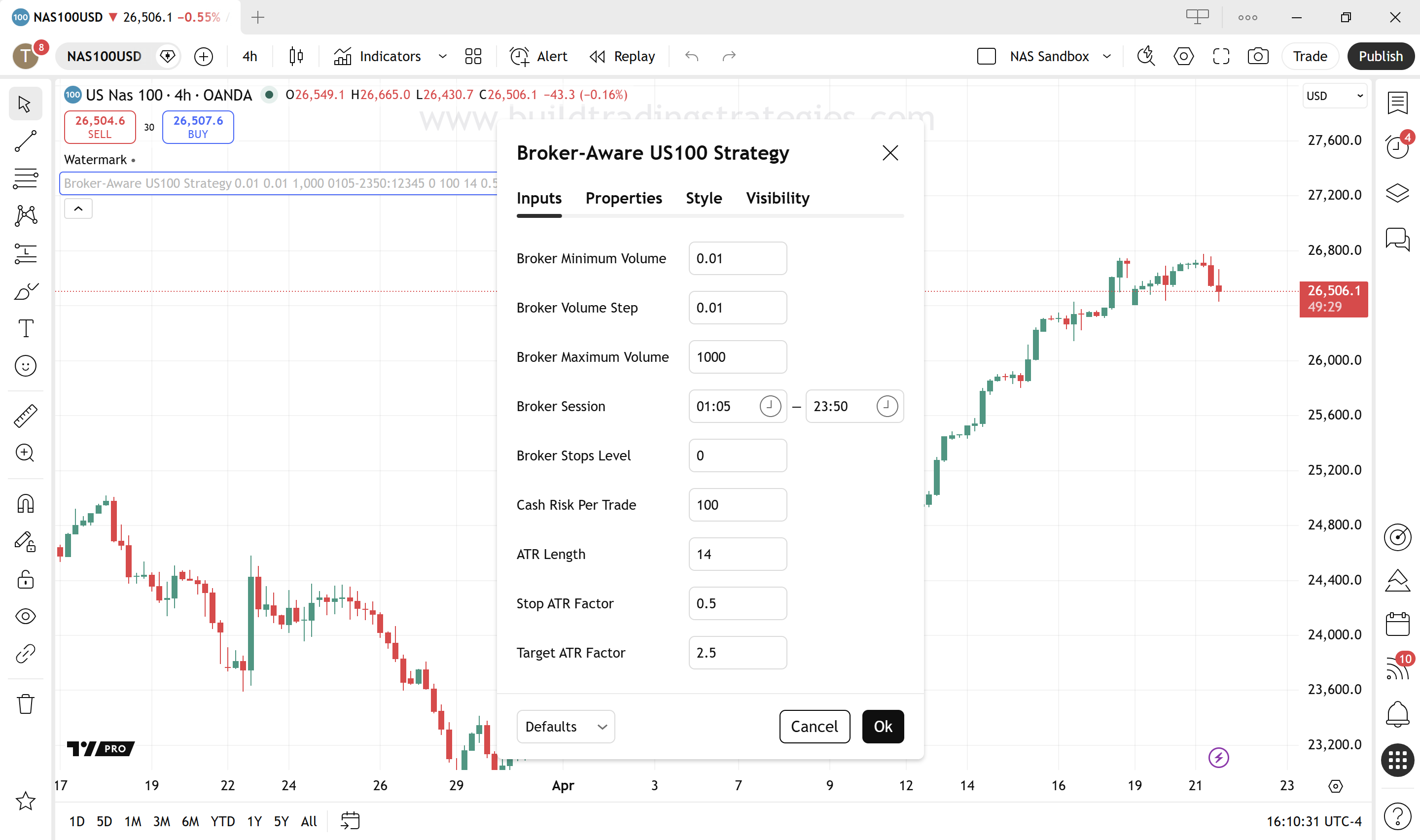
The important thing here is not the exact strategy logic. It is that the script is now explicitly carrying broker assumptions inside it — volume constraints, session window, stops level, pricing format — as configurable inputs rather than hard-coded numbers.
One detail worth calling out: `process_orders_on_close=true` in the strategy declaration forces Pine to evaluate orders against confirmed bar closes rather than intrabar. That matches the assumption most backtests silently rely on, and it keeps the session filter meaningful — entries only trigger once the bar that produced the signal has actually closed.
This is also why Strategy Order Types Explained and Higher Timeframe Confirmation are natural companions to this topic.
What TradingView still cannot fully replicate
Even with all of those improvements, TradingView is still not the broker.
| I can mirror | But I cannot perfectly replicate | |---|---| | Volume rules | Live spread expansion | | Session windows | Slippage under market execution | | Tick conversions | Fill-policy edge cases | | Stop guards | Platform-specific execution quirks | | Commission approximations | Server-side nuances in order handling | | Fixed-risk rounding logic | Overnight swap timing and triple-swap rolls |
Partial fills and FOK/IOC
The FTMO US100.cash specification lists Fill or Kill (FOK) and Immediate or Cancel (IOC) as the filling modes for market execution. These are per-order policies: each order uses one or the other. FOK rejects the order entirely if it cannot be fully filled at the requested price. IOC fills whatever is available at that price and cancels the rest.
For small retail lot sizes on a liquid index, this rarely bites. But it is a real constraint that Pine Script cannot model — TradingView assumes every order fills completely at the expected bar-close price.
Margin and concurrent exposure
The backtest also does not see margin. FTMO requires a fraction of the notional to be locked while a trade is open, which caps how many concurrent positions a strategy can realistically run. A backtest that happily pyramids into many lots simultaneously may be mathematically fine but operationally impossible once real margin is applied. For prop-firm challenges in particular, the account's own rules — maximum daily loss, maximum overall loss, maximum allocation, news-event restrictions — sit on top of the broker spec and can invalidate trades the script thought were valid.
That does not make TradingView useless. It just means I need to keep it in the right role: a research and design environment, not a one-click proof that a live FTMO deployment will behave identically.
The prop-firm lens
Prop-firm traders are not just trying to find profitable entries. They are trying to find robust execution under constraints — the broker's, and the firm's own.
That means the question is not simply:
> “Does this strategy make money in TradingView?”
The better question is:
> “Does this strategy still make sense once it is forced to obey the actual symbol, session, volume, and cost rules of the environment I want to trade in?”
That is a much harder question, and it is also the right one. If I ignore the broker, I am only testing half the system. If I bring the broker constraints into the strategy design, the backtest stops being just a chart exercise and starts becoming something much closer to a tradable model.
That is not glamorous work, but it is exactly the kind of work that makes the difference between a nice-looking backtest and a strategy I can take seriously.
FTMO instrument specifications change over time. The values shown in this guide — minimum volume, volume step, session hours, commission rate, swap — reflect a specific snapshot. Always verify the current specification directly in your MetaTrader 5 platform via View → Symbols → [instrument] → Properties before building or deploying a strategy. Relying on outdated specs is a common source of sizing and cost errors.
Broker-constraint checklist before deploying
Before treating any strategy as ready to deploy through a broker or prop firm, I run through this checklist:
- [ ] Minimum volume respected — strategy will not try to trade below broker minimum
- [ ] Volume step rounding applied — sizes are rounded down to valid increments
- [ ] Maximum volume guarded — strategy cannot exceed broker maximum
- [ ] Session filter active — trades only fire during the broker's live session hours
- [ ] Session timezone pinned — `time()` uses the broker's server timezone, not the chart's
- [ ] Commission modelled — correct Pine commission type, on the correct side (per-side vs round-turn)
- [ ] Swap cost considered — overnight drag estimated separately, not folded into `commission_value`
- [ ] Spread assumption realistic — not defaulted to zero
- [ ] Stop distance validated — stop not inside the broker's stops level
- [ ] Margin and concurrent exposure sane — strategy will not try to hold more lots than the account can margin
- [ ] Prop-firm rules respected — daily/max loss, news restrictions, and maintenance windows factored in
- [ ] Instrument specification verified in MT5 — not relying on cached or outdated data
None of these items individually will transform a losing strategy into a winning one. Together, they make the difference between a backtest that is honest about what it is and one that quietly flatters itself.